
Introduction
Have you ever had a genuinely useful conversation with an AI chatbot — and then completely forgot to save it? Maybe the chatbot helped you draft something important, gave you a strategy that actually worked, or explained a complex problem in a way that finally made sense. And then it was gone. That feeling of losing something valuable is exactly why AI chatbot conversations archive systems exist — and why they matter far more than most people realize.
Every single day, your chatbot is having hundreds — sometimes thousands — of conversations with real customers. It is answering questions, solving problems, handling objections, and revealing exactly what your audience wants. But when those conversations disappear, so does every insight inside them.
Most businesses focus entirely on making their chatbot smarter. Very few focus on what the chatbot already knows — stored inside every chat it has ever had.
A properly built chatbot conversation archive does far more than keep records. It turns everyday chat logs into long-term business intelligence, feeds your AI models with real-world training data, keeps you compliant with regulations like GDPR and CCPA, and gives your team proof instead of assumptions.
This guide covers everything — what a chatbot archive is, how to save and retrieve AI chat history across every major platform, real business use cases, data privacy rules, and the advanced AI concepts your competitors are not writing about yet.
What Is an AI Chatbot Conversations Archive?
An AI chatbot conversations archive is a structured, searchable record of every interaction between users and your AI-powered chatbot. It stores the full conversation history — user queries, bot responses, timestamps, session paths, sentiment signals, and resolution outcomes.
Think of archived AI chats like old notes — the kind you scribbled during an important meeting and tucked away in a folder. At the time they feel ordinary. Six months later, they are the most valuable thing in the drawer. Or think of it this way: if your chatbot is a digital team member, the archive is its complete work log — showing what customers asked, how the bot responded, and whether each interaction helped or failed.
“An archive is not just a basic chat log. It is a living dataset that grows more valuable over time. Every new conversation adds clarity about your customers and your business.”
Without an archive, conversations vanish the moment a session ends. With one, each interaction becomes a permanent learning asset — one that compounds in value the longer you use it. And if you ever switch platforms, change providers, or lose account access, an archive means you never lose the valuable work you created with AI.
What Gets Stored in a Chatbot Archive?
A high-quality AI chat history record captures much more than plain text:
| Data Type | What It Includes |
|---|---|
| Message content | Full user queries and bot responses |
| Timestamps | Exact date and time of every message |
| Session IDs | Unique identifiers linking all messages in one conversation |
| Conversation paths | The flow of how the dialogue progressed |
| Sentiment signals | Emotional tone detected during the interaction |
| Intent labels | What the user was trying to accomplish |
| Resolution outcome | Whether the chatbot solved the problem or escalated it |
| Model identifiers | Which AI version generated each response |
| Token usage | Computational cost per conversation |
| Response latency | Speed of bot replies — a key performance metric |
| Channel source | Web, mobile app, email, social media, or voice |
These components together form the foundation of any serious chatbot data management strategy.
Why Your Business Needs an AI Chatbot Conversations Archive
Most businesses first think about chat archives for compliance or dispute resolution. Those are valid reasons — but they are not the real advantage.
The true value of an AI chatbot conversations archive is continuous improvement. Here is exactly why it matters.
1. You Stop Guessing — You Get Proof
When you do not store conversations, you operate on surface-level metrics. You can see how many chats your bot handled, but you cannot see what customers actually asked, where they got confused, or what problems keep surfacing week after week. You miss emerging product issues, knowledge gaps, and repeated friction points entirely — sometimes for months.
An archive changes this completely. It gives you real customer language, real problems, and real patterns at scale — without surveys, filters, or guesswork. That is the shift from assumption-driven to evidence-driven decisions. Proof instead of assumptions.
Real example: An online retailer noticed repeated chatbot failures on delivery delay questions. By reviewing their archived conversations, they discovered customers were phrasing the same question in dozens of different ways. Once those real phrases were added as training data, the chatbot improved dramatically and reduced support escalations within days. That result was only possible because the conversations were archived.
2. Your Archive Is Your Voice of Customer Intelligence
Beyond analytics dashboards and performance metrics, an AI chatbot conversations archive is your most direct window into the voice of the customer — not filtered survey responses, not polished public reviews, but the real unscripted language customers use when they think they are just asking a machine a question.
In 2026, as AI-powered search engines like Google AI Overviews and Perplexity increasingly index conversational search patterns, the exact phrases inside your chatbot archive are becoming as valuable for SEO strategy as traditional keyword research. Businesses that mine their archives for natural customer language gain a compounding advantage in both chatbot performance and organic search visibility.
Archives also let you detect emerging product issues days or weeks before they appear in negative reviews or formal support tickets — because customers ask the chatbot first, in their own words, before they escalate anywhere else.
3. Your AI Model Gets Smarter Over Time
Archived conversations are the best possible training data for AI model improvement — because they come from your actual customers, not generic datasets.
The landmark LMSYS-Chat-1M dataset — containing 1 million real-world conversations from over 210,000 unique users — demonstrated exactly how archived chatbot data accelerates AI development at scale. Your own archive, even at a few thousand conversations, works the same way. You study which responses worked, identify where the bot needed human help, and feed those learnings back into your natural language processing (NLP) training pipeline.
4. You Discover Conversion Intelligence Hidden in Conversations
Marketing teams describe features one way. Customers describe them another way entirely.
One software company discovered through their chatbot conversation history that customers repeatedly asked about “automatic invoice reminders” — even though the feature was labeled differently on their website. Updating the language to match real customer phrasing increased conversions and reduced confusion in the same update cycle. This is conversion intelligence extracted directly from your archive at zero extra cost.
5. You Meet Compliance Requirements
Many industries require businesses to retain records of digital customer communication. An archive built with audit logs, 256-bit AES encryption, and documented data retention policies forms a critical part of your regulatory compliance infrastructure — for GDPR, HIPAA, CCPA, and financial services regulations alike.
6. Your Support Team Performs Better
When support agents can access a complete chatbot conversation history, they resolve issues faster and never ask customers to repeat themselves. Agents see the full context from the first message. This cuts resolution time and measurably improves customer satisfaction scores.
How an AI Chatbot Conversations Archive Actually Works
Understanding the mechanics of chatbot conversation archiving helps you build or evaluate the right system for your needs.
Step 1 — Real-Time Data Capture
The moment a user sends a message, the system triggers a data capture event. It records the raw message text, timestamp, session identifier, channel source, and contextual signals — including whether the user abandoned the conversation, escalated to a human agent, or clicked a suggested response.
Step 2 — Structuring the Data
Raw conversation data is transformed into structured formats for storage and later analysis. The most widely used formats include:
- JSON — the standard for API-driven systems; ideal for AI training pipelines
- CSV — tabular format suited for analytics tools and spreadsheet reporting
- HTML — human-readable transcripts for support team review
- PDF — audit-ready exports for compliance documentation
- Markdown — lightweight and developer-friendly for documentation
Each conversation record is tagged with 3 to 5 metadata labels covering intent category, sentiment, urgency level, resolution status, and customer type — enabling fast filtering and segmentation later.
Step 3 — Storage in the Right Database
| Database | Best Use Case |
|---|---|
| PostgreSQL / MySQL | Relational, structured data with complex query needs |
| MongoDB | Flexible document storage for varied conversation structures |
| Google BigQuery | Large-scale analytics across millions of conversations |
Systems processing 100 or more conversations per day typically require cloud-native or distributed database architectures to maintain performance at scale.
Step 4 — Auto-Tagging and Categorization
Modern archive systems apply automatic tagging at the moment of storage — sorting conversations by topic, mood, urgency, and customer type without any manual effort. One conversation can receive multiple tags when relevant: a chat about both a billing issue and a feature request gets tagged under both categories. This ensures it surfaces in either search context and nothing important gets buried in a single-category view.
Step 5 — Indexing and Retrieval
Once stored and tagged, the archive needs to be fast and searchable. Modern systems combine two approaches:
- BM25 search algorithm — proven keyword-based retrieval for exact-match queries
- Vector similarity search — AI-powered semantic search that finds relevant conversations even when exact keywords are not used
Conversation indexing is organized using YYYYMMDD naming conventions for file-based systems, enabling efficient time-range queries and structured monthly archiving cycles.
How to Save AI Chatbot Conversations: Platform-by-Platform Guide
This is one of the most searched questions around chatbot archives. Here is exactly how to do it on every major platform.
ChatGPT
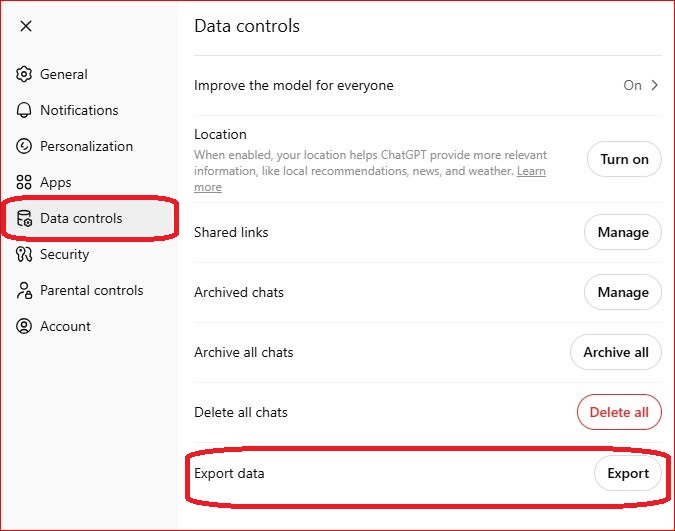
Conversations appear in the left sidebar automatically unless chat history is disabled. For a full backup go to Settings → Data Controls → Export Data. You will receive a download link by email containing all your conversations as a JSON and HTML file — complete with timestamps and full message structure.
Figure 1: Overview of ChatGPT Chats
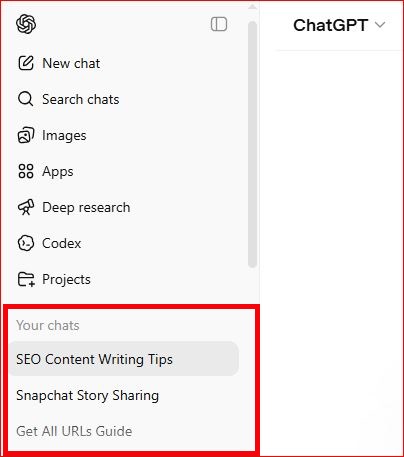
Fig: Exporting Data from ChatGPT
Google Gemini
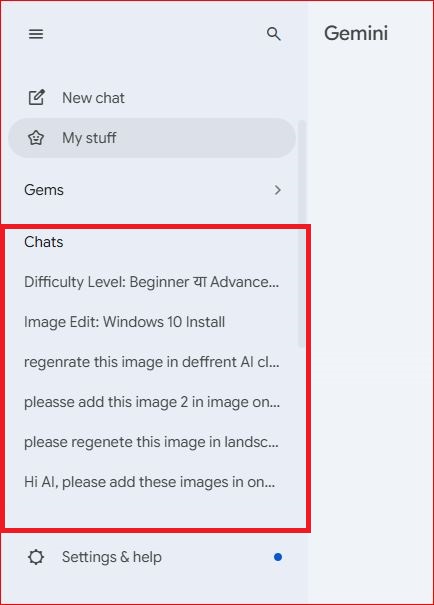
Gemini saves all conversations automatically to your Google account. Your chat history is accessible at any time through the activity panel in your Google account settings and can be managed or deleted from there at will.
Microsoft Copilot
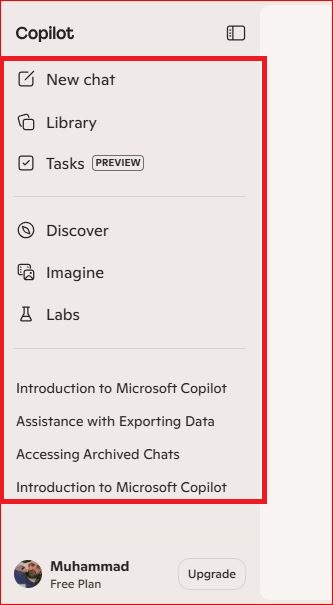
Microsoft Copilot saves conversation history within the Microsoft 365 environment. Access previous chats through the Copilot sidebar in Edge, Teams, or the Copilot web interface. For bulk export, use the Microsoft account privacy dashboard to download your complete interaction history as a structured data file.
Manual Backup — Works on Every Platform
The simplest method that works everywhere: copy and paste conversations into a dedicated folder system. Create a folder called “AI Notes” or “Chat Ideas” with subfolders for work, personal projects, and experiments. This low-tech method requires no setup and protects you completely from platform policy changes or account access issues. Relying solely on built-in chat history is a genuine risk — if a platform changes its storage policy or your account is interrupted, you could lose everything.
For Businesses — Automatic Archiving
Automatic archiving is the only scalable approach for production systems. Configure your chatbot platform to push every completed session to your storage system via webhook or API call at the moment each session ends.
Step-by-step export from enterprise platforms:
- Open your chatbot platform’s admin dashboard
- Navigate to the conversation logs or history section
- Apply filters — date range, user ID, resolution status, intent category, channel source
- Select your export format based on purpose (JSON for AI training, CSV for analytics, PDF for compliance)
- Download the file and transfer it to your archive storage system
- Verify the export is complete and correctly structured
Can Deleted Conversations Be Recovered?
If your database uses soft-delete and backups exist, recovery is possible. If records were hard-deleted without any backup, recovery is generally not possible. Most major platforms also do not retain permanently deleted messages on their servers. Proactive, automatic archiving before you ever need it is the only reliable protection.
Are Saved Chatbot Conversations Private?
Conversations saved within a platform are governed by that platform’s privacy policy — which may include using your data to improve their models unless you explicitly opt out. Conversations you export and store yourself are fully private and controlled only by your own security setup. For sensitive business data, always export to your own encrypted storage rather than relying on platform-side history.
Best Ways to Search, Sort, and Organize Chatbot Conversation History
A large archive without good organization becomes unusable fast. Here are the strategies that make chatbot log management genuinely efficient.
Advanced Filtering Options
Good archive systems offer layered filtering so you can narrow thousands of conversations to exactly what you need:
- Time filters — specific dates, date ranges, or rolling time windows like “last 30 days”
- Channel filters — separate conversations by source: web chat, mobile app, email, social media, or voice
- Mood and sentiment filters — surface positive, negative, or neutral conversations instantly
- Status filters — resolved, escalated, or abandoned chats
- Customer type filters — group conversations by account tier, segment, or geography
- Urgency filters — immediately surface high-priority conversations requiring fast attention
Combining multiple filters simultaneously — for example, negative sentiment + unresolved + enterprise customer tier — pinpoints the most critical conversations without scrolling through thousands of records.
Saved Search Alerts
One of the most underused features in modern chatbot archive systems is saved search alerts — automated notifications triggered whenever new conversations match predefined criteria. Sales teams configure alerts for when prospects ask about enterprise pricing. Product managers get notified when users mention specific feature requests. Support leads receive alerts the moment a new category of complaint starts appearing repeatedly.
Rather than manually reviewing thousands of transcripts every week, saved alerts deliver the most important conversations directly to the people who need to act on them — automatically and in real time.
Conversation Threading
A single customer issue rarely resolves in one session. They might message your chatbot on Monday, return via the mobile app on Wednesday, and escalate through email on Friday. Conversation threading connects these separate interactions into a unified customer journey — giving your team a complete picture of how the issue evolved, what was attempted, and why it resolved or escalated. Without threading, each conversation looks isolated. With it, you see the full story and can make decisions based on complete context rather than fragments.
Quality Scoring
High-performing archive systems apply quality scoring — an automated rating for every conversation based on resolution success, customer satisfaction signals, response accuracy, and average handling time. High-scoring conversations become gold-standard examples for AI model training. Low-scoring conversations get flagged for immediate review, exposing knowledge gaps, broken flows, and incorrect bot responses. Tracking quality scores consistently over time is one of the clearest signals of whether your chatbot is genuinely improving or simply handling more volume without getting better.
Conversation Path Analysis
Conversation path analysis maps the routes users take through your chatbot interactions. Successful paths — where users reach their goal efficiently — become templates for optimization. Paths with high abandonment rates pinpoint exactly where users get confused or frustrated. Testing different conversation flows and comparing outcomes against archived path data removes guesswork from chatbot design and shows definitively which approach works.
Real Business Use Cases for AI Chatbot Conversation Archives
E-commerce: Reducing Product Returns
An e-commerce company analyzed 12,000 archived chatbot conversations and discovered that the majority of return queries were driven by sizing confusion — not product quality. The team redesigned product pages using exact language from the archive.
Result: 18.5% reduction in product returns. Source: ReAIChat, 2026.
Healthcare: Faster Triage Decisions
A healthcare platform analyzed 4,300 archived conversations using sentiment analysis to refine its risk-scoring algorithm.
Result: Average triage decision time dropped from 8.2 to 5.6 minutes. Patient satisfaction reached 91% approval. Source: Jatheon, 2026.
Education and E-Learning
Education platforms are among the fastest-growing segments for chatbot archiving. When an AI tutor archives every student question, educators can identify which concepts confuse learners most, which explanations successfully resolve misunderstanding, and where the AI tutor’s knowledge falls short. These archives directly improve curriculum accuracy and create a continuous feedback loop between real student struggles and content development — without requiring manual review by instructors.
Banking and Fraud Prevention
In banking and financial services, chatbot archives serve a dual purpose: meeting regulatory record-keeping requirements and detecting fraud patterns early. Archived conversations can reveal coordinated social engineering attempts, unusual account inquiry patterns, and phishing scripts targeting customers through chat interfaces — often weeks before fraud losses appear in transaction data. This makes the archive both a compliance tool and an active fraud prevention asset.
Internal Enterprise Communication
Companies increasingly deploy internal AI assistants to handle HR questions, explain policies, support onboarding, and assist with knowledge retrieval. Archiving these internal enterprise AI conversations enables productivity analysis at scale — revealing which processes cause the most confusion, where documentation gaps exist, and how effectively internal AI tools are actually being used across departments.
SaaS: AI Training Dataset Development
A SaaS company used 12 months of archived customer support conversations to fine-tune their language model on domain-specific terminology and objections. The fine-tuned model outperformed the generic base model on internal benchmarks — and the training dataset cost nothing beyond what they were already capturing through routine archiving.
Chatbot Analytics: Turning Archives into Actionable Intelligence
A chatbot conversations archive is only as valuable as your ability to extract insights from it. Key analytical capabilities that separate high-performing archive systems from passive storage:
- Sentiment analysis — classifying conversations as positive, neutral, or negative to track satisfaction trends over time
- User intent detection — categorizing the purpose behind each conversation at scale
- Performance metrics — tracking response latency, resolution rate, session duration, and escalation frequency
- Token usage tracking — monitoring computational cost per conversation to optimize AI efficiency
- Predictive insights — using historical conversation patterns to anticipate future customer needs and detect emerging issues before they scale into major problems
- Automated summarization — AI-generated summaries of long or complex conversations, allowing teams to understand a 40-message exchange in seconds
- Conversation path analysis — mapping which dialogue flows succeed and which create friction
- Quality scoring — rating every conversation against resolution and satisfaction benchmarks automatically
Modern chatbot analytics dashboards surface all of these dimensions in real time, turning your archive from a static record into a live intelligence layer every team can act on.
Data Privacy, Security, and Compliance
GDPR (European Union)
Under GDPR Article 5, personal data must be kept “no longer than is necessary.” Many compliant systems auto-delete personally identifiable conversation data after 30 to 90 days while retaining anonymized metadata for longer analysis. Your archive must support DSAR workflows — enabling you to retrieve, correct, or permanently delete all data linked to a specific user on request.
CCPA (United States)
The California Consumer Privacy Act (CCPA) gives California residents rights comparable to GDPR — including the right to know what personal data is collected, the right to delete it, and the right to opt out of its sale. For businesses serving California customers, chatbot archives must support CCPA deletion requests alongside GDPR DSAR workflows.
HIPAA (Healthcare)
Any archive handling protected health information requires end-to-end encryption, strict role-based access controls (RBAC), and documented retention schedules aligned with HIPAA standards.
Encryption, Access Control, and PII Protection
| Security Layer | Standard |
|---|---|
| Data encryption | 256-bit AES at rest and in transit |
| Access control | Role-based access control (RBAC) |
| Audit trail | Immutable logs of every access and modification event |
| Pseudonymization | Replacing identifiers with coded substitutes that preserve analytical value |
| Tokenization | Replacing names, emails, and account IDs with random tokens — maintaining cross-session consistency without exposing real identities |
| Data minimization | Store only data that is necessary; never collect sensitive information beyond your defined use case |
Tokenization and pseudonymization are distinct methods worth understanding. Tokenization replaces real identifiers with consistent random tokens — preserving your ability to track one customer’s journey across sessions without ever storing their real identity. For sensitive customer-facing archive systems, tokenization generally provides stronger privacy protection than pseudonymization alone.
Advanced AI Concepts: Where Chatbot Archives Become Truly Powerful
This is the section most competitors skip entirely — and it represents the biggest competitive advantage available to businesses that invest in it.
Vector Databases and Semantic Search
Traditional keyword search only finds exact matches. Vector databases — such as Pinecone, Weaviate, or Chroma — store conversations as high-dimensional numerical embeddings. This enables semantic similarity search: finding all conversations about billing issues even when users never used the word billing. At scale, this transforms a passive archive into an intelligent, self-organizing knowledge base.
Retrieval-Augmented Generation (RAG)
Retrieval-Augmented Generation (RAG) connects your AI model to your conversation archive at inference time. Instead of relying solely on training data, a RAG-powered chatbot retrieves specific archived conversations as live context before generating a response — making it dramatically more accurate, personalized, and domain-relevant with every interaction.
RAG-enabled chatbots powered by their own conversation archives consistently show 40 to 60% improvement in response accuracy on domain-specific queries compared to base models without retrieval.
Conversational Memory and Persistent Context
Modern AI systems are developing persistent conversational memory — the ability to remember past sessions across time. The conversation archive is the infrastructure that makes this possible. By indexing past sessions and making them retrievable at inference time, AI systems can provide genuine continuity across interactions rather than starting from zero every session.
Fine-Tuning LLMs With Your Own Chat Logs
Beyond RAG, conversation archives enable direct LLM fine-tuning on your domain-specific data. A company with a large archive of customer support conversations can fine-tune a base language model to become a highly specialized assistant — one that deeply understands product terminology, common objections, and the brand’s communication style. This proprietary training data is something competitors cannot replicate, making it one of the most durable AI advantages a business can build.
Common Challenges (and How to Solve Them)
| Challenge | Why It Happens | Solution |
|---|---|---|
| Data overload | 100+ chats/day accumulate fast | Tiered storage + automated lifecycle management |
| Rising storage costs | Unmanaged archives grow without limit | Cold storage migration after 90 days |
| Duplicate records | Multiple capture events for one session | Deduplication logic at data ingestion |
| PII exposure | Sensitive data stored without controls | Tokenization + RBAC + retention limits |
| Unusable search | No indexing on large archives | Vector embeddings + BM25 hybrid search |
| Fragmented insights | Multiple teams keeping separate archives | Centralized archive platform with shared access |
| Bias in training data | Archive over-represents one customer type or language | Regular representation audits across user segments |
| System integration gaps | Archive doesn’t connect to CRM or helpdesk | API integration layer between archive and existing tools |
Avoiding bias in AI training data is a challenge that receives too little attention. If your archive disproportionately contains conversations from one customer type, language group, or issue category, models trained on that data will reflect those biases. Responsible data governance means auditing your archive regularly for representation gaps — ensuring training data reflects the full diversity of your actual user base.
Best Practices for Managing an AI Chatbot Conversations Archive
- Automate capture from day one — manual archiving does not scale and creates dangerous data gaps
- Define your data retention policy before collecting data — know your GDPR, CCPA, and HIPAA obligations upfront
- Store only necessary data — data minimization is both a regulatory principle and a practical cost control measure
- Tag every conversation with 3 to 5 categories: intent, sentiment, urgency, resolution status, and customer type
- Use YYYYMMDD naming conventions for all time-stamped exports and file-based archives
- Encrypt everything — 256-bit AES at rest and in transit, with no exceptions
- Deploy RBAC — different permission levels for support agents, data scientists, and compliance officers
- Set up saved search alerts — automate notifications for high-priority conversation categories so the right person sees them immediately
- Audit your archive regularly — check for duplicates, expired records, representation gaps, and uncategorized conversations every quarter
- Build semantic search — vector embeddings are no longer optional for archives beyond 10,000 conversations
- Connect your archive to analytics dashboards — make insights accessible to non-technical stakeholders across the business
- Document your data governance posture — DSAR workflows, CCPA and GDPR retention schedules, tokenization standards, and encryption policies in writing
Frequently Asked Questions
What is an AI chatbot conversations archive?
An AI chatbot conversations archive is a structured, searchable system that stores every interaction between users and AI chatbots — including full message history, timestamps, session IDs, intent labels, sentiment signals, channel source, and model identifiers. It enables analytics, AI training, compliance reporting, and continuous chatbot improvement.
How do I save AI chatbot conversations?
For personal use: export from ChatGPT (Settings → Data Controls → Export Data), access Gemini history via your Google account, or retrieve Copilot history through the Microsoft privacy dashboard. Use tools like Chat2Note for cross-platform exports to Markdown or Notion. For business systems: configure automatic archiving via API or webhook at session end — never rely on manual saving for production chatbots.
Are saved chatbot conversations private?
Conversations saved within a platform are subject to that platform’s privacy policy, which may include using your data for model training unless you opt out. Conversations you export and store yourself are fully private and under your own control. For sensitive business data, always export to your own encrypted, access-controlled storage rather than relying on platform-side history.
Can you recover deleted chatbot conversations?
Only if soft-delete and backups were in place before deletion. Most platforms do not retain permanently deleted messages, and hard-deleted records without backups are typically unrecoverable. Proactive archiving is the only reliable protection.
Why are chatbot archives important for AI training?
Real conversational data from your actual users is the most domain-relevant training signal available. Datasets like LMSYS-Chat-1M (1 million conversations, 210,000 users) show the scale at which archived data accelerates AI capability. Your own archive gives you a proprietary dataset competitors cannot access or replicate.
What is the best format to store chatbot chat logs?
JSON for API-driven systems and AI training pipelines; CSV for analytics and reporting; PDF for compliance documentation. Enterprise systems typically store in JSON internally and export to other formats as needed. Apache Parquet is increasingly used for large-scale cold storage due to its compression efficiency and support for predicate pushdown queries.
How long should chatbot conversation data be retained?
Best practice is 1 to 2 years for active storage, followed by cold storage or deletion based on regulatory requirements. GDPR-compliant systems typically auto-delete personally identifiable information after 30 to 90 days while retaining anonymized metadata longer. CCPA imposes similar data minimization principles for California-based users.
Conclusion
An AI chatbot conversations archive is not a storage system — it is a strategic business asset that powers smarter AI, better customer experiences, regulatory compliance, and insights no survey or analytics tool can match.
Start with the fundamentals: automate your data capture, structure your chatbot data storage, implement encryption and access controls, define your retention policy, and set up saved search alerts so the most important conversations never go unnoticed. Then build toward advanced capabilities — semantic search with vector embeddings, RAG integration, conversation threading, quality scoring, and LLM fine-tuning pipelines built on your own conversational data.
The businesses investing seriously in chatbot conversation management today are building proprietary AI advantages that compound in value every single month. The conversations are already happening. The only question is whether you are capturing, organizing, and learning from them — or letting that intelligence disappear when the chat window closes.

35 Comments
Pingback: AI Chatbot Conversations Archive: Complete Guide – Skyteck
Amazing options for traditional wedding looks.
Great range of men’s occasion wear.
I was suggested this web site by my cousin Im not sure whether this post is written by him as no one else know such detailed about my trouble You are incredible Thanks
Pretty! This has been a really wonderful post. Many thanks for providing these details.
Phim Sex – Tổng hợp phim sex Việt Nam – GaiDamVL
Phim Sex – Tổng hợp phim sex Việt Nam – GaiDamVL
For the reason that the admin of this site is working, no uncertainty very quickly it will be renowned, due to its quality contents.
very informative articles or reviews at this time.
This is really interesting, You’re a very skilled blogger. I’ve joined your feed and look forward to seeking more of your magnificent post. Also, I’ve shared your site in my social networks!
t2yqbw
This is really interesting, You’re a very skilled blogger. I’ve joined your feed and look forward to seeking more of your magnificent post. Also, I’ve shared your site in my social networks!
https://shorturl.fm/Vi86G
Well explained applications for offshore oil & gas sectors.
Good read for professionals in petrochemical industries.
I really like reading through a post that can make men and women think. Also, thank you for allowing me to comment!
Kullanımı kolay, canlı yayın tarafı dikkat çekiyor.
https://shorturl.fm/3KOuZ
very informative articles or reviews at this time.
https://shorturl.fm/DLAsK
Canlı yayın izlemek isteyenler için iyi bir alternatif.
Great article, very helpful!
https://shorturl.fm/O7Y5q
Clear examples made a big difference. Thanks!
https://shorturl.fm/uhb8h
https://shorturl.fm/8H7kv
Phim Sex – Xem Phim Sex Nóng Chọn Lọc Mới Nhất – Vlxvn.Blog
https://shorturl.fm/vpxKO
https://shorturl.fm/21Yl0
https://shorturl.fm/Ux8JM
https://shorturl.fm/naElI
webdesign agentur bamberg https://websiteerstellenlassenbamberg.de/
webdesign agentur bamberg https://websiteerstellenlassenbamberg.de/
https://shorturl.fm/urmCm
https://shorturl.fm/QNN9i