

Quick Answer
The best AI for screenwriting in 2026 is Claude for long-form dialogue and script notes, Sudowrite for creative scene work, and Arc Studio Pro for industry-standard screenplay formatting with built-in AI. For TV writers who need to manage series bibles and episode arcs, Storyflow is the strongest option.
Introduction
The best AI for screenwriting depends on what stage of the process you are in. If you need help with dialogue, structure, rewriting, or formatting, there is a specific tool that does each job better than the rest.
AI will not write a great screenplay for you. But it will get you past the blank page faster, help you break story beats, and cut the time you spend on the mechanical parts of writing. This guide covers every tool worth knowing about in 2026, with honest notes on where each one actually helps.
What Makes a Good AI for Screenwriting?
Most AI tools can generate text. Screenwriting needs more than that.
A general writing tool will give you a scene if you ask for one. But it will not remember your characters’ voices three scenes later. It will not flag a pacing problem in Act 2. And it will not format your script in industry-standard Fountain or Final Draft style.
Here is what actually matters when you are picking an AI screenwriting tool:
- Story structure knowledge. Does it understand three-act structure, beat sheets, and scene-level pacing?
- Context memory. Can it hold your full script or series bible in its context window?
- Screenplay formatting. Does it produce scene headings, action lines, and dialogue in the right format?
- Dialogue quality. Does the dialogue sound like people talking, or like a chatbot explaining a plot?
- Rewriting tools. Can you take a weak scene and get three better versions to choose from?
Keep those five questions in mind as you read through the tools below.
Best AI for Screenwriting: Quick Comparison Table
| Tool | Best For | Screenplay Formatting | Starting Price |
|---|---|---|---|
| Claude | Dialogue, script notes, long scripts | Manual | Free / $20/mo |
| Sudowrite | Creative scene work, prose quality | Partial | $19/mo |
| Arc Studio Pro | Dedicated screenplay app with AI | Industry-standard | Free / $9.99/mo |
| Storyflow | Series bibles, pilots, beat sheets | Export to Fountain | $7.99/mo |
| ChatGPT | General brainstorming, outlines | Manual | Free / $20/mo |
| Final Draft with AI | Production-ready formatting | Industry-standard | $249.99 one-time |
| Scriptmatix | Guided story development | Yes | Contact for pricing |
| WriterDuet | Remote collaboration | Industry-standard | Free / $12/mo |
| Squibler | Budget-friendly all-in-one | Yes | $16/mo |
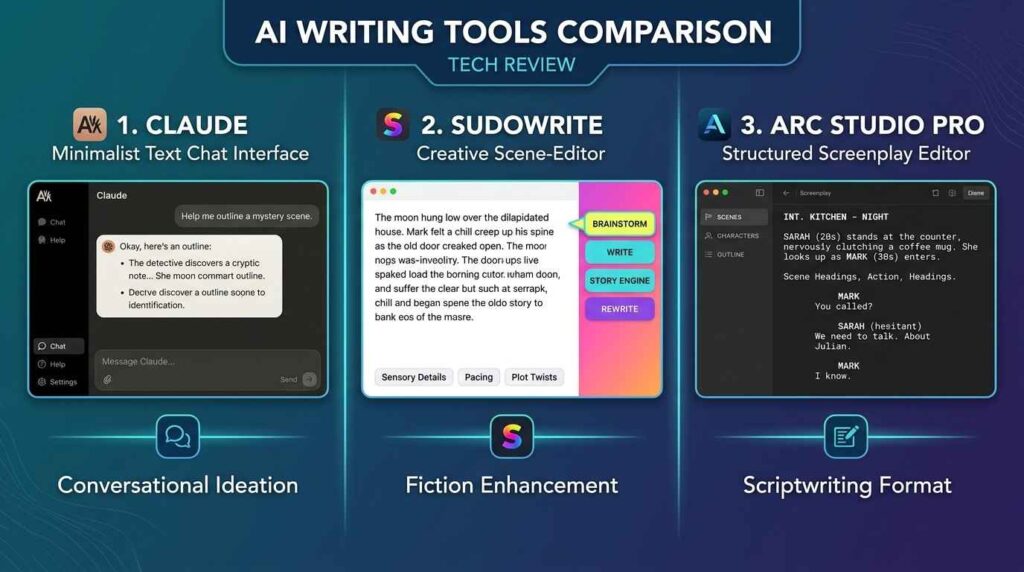
1. Claude: Best Overall for Dialogue and Long-Form Scripts
If you write features or long pilots, Claude is the most useful AI in your toolkit right now.
Its 1M token context window (on the Pro plan) means you can paste an entire 95-page script and ask for detailed scene-level notes. Most other AI tools lose the thread after the first 30 pages. Claude does not.
The dialogue it produces is also noticeably better than most alternatives. Give it a character background, speech patterns, and an emotional state, and it will write dialogue that fits. Ask it to maintain a consistent voice across a 60-page pilot and it will follow through better than ChatGPT.
What Claude does well:
- Long-context script analysis and structural notes
- Dialogue that matches specific character voices
- Rewriting scenes in a different tone without losing the original meaning
- Identifying pacing problems in long scripts
What it does not do:
- It has no built-in screenplay formatting. You will need to move output into a formatting app.
- It has no story structure templates. You have to guide the process yourself.
Pricing: Free tier (limited context). Pro at $20/month. The free tier is too short for most serious screenplay work, so the Pro plan is worth it.
Best for: Feature writers, TV pilot writers, and anyone who needs strong AI notes on a complete draft.
2. Sudowrite: Best for Creative Scene Work
Sudowrite was built for fiction writers. But its AI engine is the strongest available for raw creative quality in script work.
The “Describe” feature takes a sparse action line and expands it into a cinematic, sensory description. The “Brainstorm” tool gives you five different ways to approach a scene when you are stuck. The “Feedback” tool gives developmental notes on pacing, character, and structure.
The prose quality is consistently above other AI tools. Dialogue sounds like people talking. Action lines are specific and visual. That makes it the best tool for the writing-level work that happens after you have your structure mapped out.
What Sudowrite does well:
- Expanding action lines into vivid scene description
- Generating dialogue variants for comparison
- Creative feedback on pacing and scene energy
- Maintaining prose quality across long rewrites
What it does not do:
- It is designed for prose fiction, not screenplay format. You will need a separate formatting tool.
- It does not help much with YouTube scripts or short video content.
Pricing: Hobby at $19/month (90,000 AI words). Professional at $29/month (300,000 words). Free trial available, no card required.
Best for: Feature and TV writers who want the highest-quality prose generation for scenes and dialogue rewrites.
3. Arc Studio Pro: Best Dedicated Screenplay App
Arc Studio Pro is the strongest all-in-one screenplay tool in 2026. It handles industry-standard formatting automatically and includes real AI features inside the editor, not just a chat box on the side.
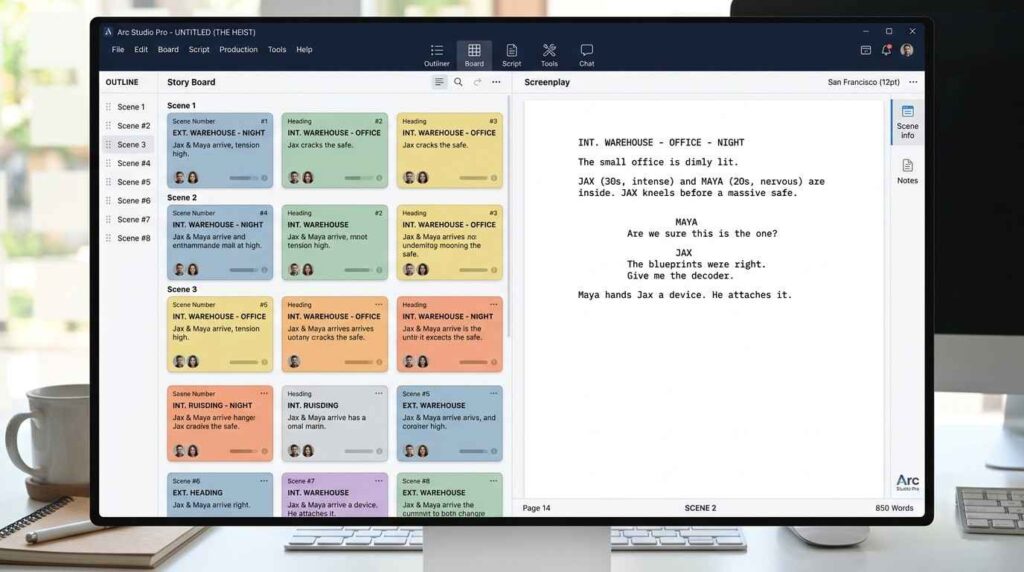
The outline board gives you a visual story structure view. You can import from Final Draft or Fountain, and export back out in those formats. The AI generates beat sheets, scene suggestions, and dialogue without ever leaving the script.
The AI writing quality is good, but not at the level of Claude or Sudowrite for creative work. The real advantage is workflow. You do not have to copy text between a chatbot and a formatting app. Everything is in one place, in proper screenplay format, from the first line.
What Arc Studio Pro does well:
- Industry-standard formatting with no extra steps
- Real-time collaboration with Google Docs-style editing
- Visual outline board for story structure
- Import and export in Final Draft and Fountain formats
What it does not do:
- The AI writing is competent but not as creative as Claude or Sudowrite
- No offline mode on the free tier
Pricing: Free (one script, basic features). Pro at $9.99/month for unlimited scripts, collaboration, and full AI features.
Best for: Working screenwriters who want one tool that handles both AI assistance and professional formatting without switching between apps.
4. Storyflow: Best for Series Bibles and TV Pilots
Storyflow is a visual canvas tool built for writers who are managing a lot of material at once. Think a pilot script, a series bible, character profiles, and a beat sheet all connected in one workspace.
The key feature is AI context. When you open the AI chat in Storyflow, it reads everything on your canvas. You can mention your pilot draft, your series bible, and a Save the Cat beat sheet in the same conversation, and the AI answers with all of it in context. That is a real difference when you are breaking episode four and need to know if it contradicts the pilot.
It includes over 200 story structure templates (Save the Cat, Hero’s Journey, Story Spine, Three-Act) as first-class objects in the workspace, not just static templates to fill in.
What Storyflow does well:
- Holds the full story world in AI context (pilot, bible, beat sheet, character notes)
- Visual canvas for spatial story planning
- 200+ story structure frameworks built into the workspace
- Best free plan of any tool on this list (unlimited projects, basic AI usage)
What it does not do:
- Fountain and Final Draft formatting requires export. It is a planning and development tool, not a formatting tool.
- Better suited for planning than for sentence-level prose generation.
Pricing: Free plan (unlimited projects, basic AI). Paid from $7.99/month.
Best for: TV writers managing pilots and series bibles, and screenwriters who plan heavily before drafting.
5. ChatGPT: Best General-Purpose Option
ChatGPT handles the widest range of script work. Screenplays, YouTube scripts, podcast outlines, video ad scripts. It understands script structure well enough to produce properly formatted scene headings, action lines, and dialogue with the right prompting.
The GPT-5 model (on the Plus plan) produces noticeably better dialogue than earlier versions. The Canvas feature lets you edit scripts inline, which removes the usual copy-paste-between-apps problem. It is also the most familiar tool for most writers, which reduces the learning curve.
The weakness is consistency. ChatGPT defaults to generic, over-explained dialogue unless you push it with very specific direction. And it does not produce industry-standard screenplay format. You will need to move the output into Arc Studio Pro or Final Draft for production use.
Pricing: Free (limited). Plus at $20/month for the best model, longer context, and Canvas. Pro at $200/month for heavy use.
Best for: Writers who want flexibility across all script types and are comfortable guiding the AI with detailed prompts.
6. Final Draft with AI: Best for Production-Ready Formatting
Final Draft has been the Hollywood standard for screenplay formatting for decades. The latest version adds AI features including beat board generation from loglines, AI-assisted dialogue, scene suggestions, and structural analysis, all inside the formatting environment every studio accepts.
The AI is not as creative as Claude or Sudowrite. It leans toward conventional structures. But the output is production-ready from the first keystroke. If you already have a Final Draft license, the AI additions are a meaningful upgrade.
Pricing: $249.99 one-time purchase. AI features require an internet connection. If you are choosing between Final Draft and Arc Studio Pro from scratch, Arc Studio’s subscription model and collaboration tools may offer better value.
Best for: Established writers already using Final Draft who want AI features integrated into a familiar workflow.
7. Scriptmatix: Best for Guided Story Development
Scriptmatix was built by Hollywood screenwriting professionals. It does not just generate text. It guides you through a structured development process from idea to treatment to outline to full screenplay, with human creative control at every step.
The Character Journey Model helps you build characters with genuine depth: contradictions, psychological arcs, and emotional evolution rather than a list of traits. The Beat-by-Beat scene building ensures you are writing from a solid structure, not generating output from a loose prompt.
What Scriptmatix does well:
- Guided development process from concept to complete screenplay
- Deep character development tools
- Story structure that prevents generic, algorithmic output
- Built for professional-level screenwriting quality
Pricing: Contact Scriptmatix for current pricing. Built for serious professional use, not casual experimentation.
Best for: Screenwriters who want a structured, guided development process and are writing at a prestige level.
8. WriterDuet: Best for Remote Collaboration
WriterDuet pioneered real-time screenplay collaboration before AI was mainstream. Two or more writers can edit the same script simultaneously, with color-coded revision tracking and offline desktop apps on Mac, Windows, and Linux.
The AI features are limited to autocomplete and basic suggestions. For serious AI assistance, you would pair WriterDuet with Claude or Sudowrite. But for collaboration itself, it is still the most reliable tool available.
Pricing: Free (3 projects). Plus at $12/month. Pro at $20/month.
Best for: Writing teams working remotely who need reliable real-time collaboration on a formatted screenplay.
9. Squibler: Best Budget Pick
Squibler is an all-in-one writing platform at $16/month that covers screenplay formatting, AI writing assistance, collaboration, and export. The screenplay mode includes proper formatting (scene headings, action, dialogue, parentheticals), an AI generator inside the editor, and a beat sheet builder.
The AI quality is middle-of-the-pack. Good enough for first drafts and structural work. You will want to refine dialogue manually or run it through Claude or ChatGPT. But the price-to-feature ratio is strong, especially if you write across multiple formats including articles, fiction, and scripts.
Pricing: $16/month.
Best for: Budget-conscious writers who need formatting and basic AI assistance without paying for multiple separate tools.
How to Choose the Right AI for Your Screenwriting Style
The honest answer for most people is this: start with Claude or ChatGPT at $20/month. They cover the bulk of AI screenwriting tasks. Then add a formatting tool if you need production-ready output.
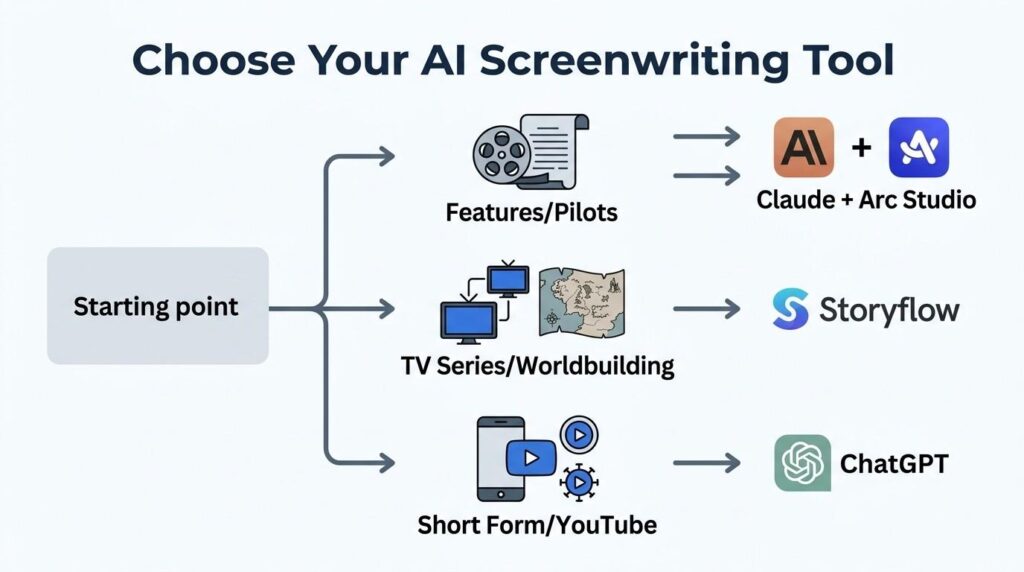
Here is a simple decision map:
If you write features or long pilots: Claude for script notes and dialogue rewrites. Arc Studio Pro or Final Draft for formatting.
If you write TV series with complex bibles: Storyflow for planning and context. Claude or Sudowrite for the actual pages.
If you write YouTube or video scripts: ChatGPT. Nothing else on this list matches it for short-form video content.
If you want one tool that does everything: Arc Studio Pro at $9.99/month is the best single-tool option. It handles formatting, AI assistance, and collaboration without asking you to switch between apps.
If budget is tight: ChatGPT free tier plus Arc Studio Pro free tier covers most writing tasks without spending anything.
One thing to note if you work on WGA-signatory productions: the 2023 WGA agreement sets guardrails on how AI can be used in professional productions. AI cannot be credited as a writer, and it cannot be used to undermine a writer’s credit or compensation. Most of the tools above are usable as development and drafting aids under those rules. When in doubt, check the WGA directly.
Related Articles:
- Why Does My Writing Get Flagged as AI?
- Which AI-Enabled Tools Should I Use?
- AI Chatbot Conversations Archive
- Best AI for Python Coding
- AI Transformation is a Problem of Governance
- AI Optical Illusions
FAQ: Best AI for Screenwriting
Q1. Can AI write a full screenplay on its own?
It can generate one, but the quality is usually closer to a rough first draft from a beginner. Structure will be present, characters will exist, and dialogue will fill the pages. But scenes lack specificity, characters blur together, and the dialogue tends to be generic. AI works best as a co-writer that generates options and handles mechanical parts while you bring the creative vision.
Q2. Which AI writes the best dialogue for screenwriting?
Claude and ChatGPT produce the best dialogue. Claude is better at maintaining a consistent character voice across a long script. ChatGPT is better at generating high-volume dialogue variants quickly. Sudowrite produces the most literary-quality prose but works best for fiction-style scene description rather than pure dialogue.
Q3. What is the best free AI for screenwriting?
Arc Studio Pro has the most useful free tier for screenwriting. It gives you one project with industry-standard formatting and basic AI features. Storyflow’s free plan is also generous, offering unlimited projects and basic AI usage. ChatGPT’s free tier works for brainstorming and outlining, though the context limits make it less useful for full script work.
Q4. Is there an AI that understands screenplay formatting?
Yes. Arc Studio Pro, Final Draft with AI, WriterDuet, and Squibler all produce proper industry-standard screenplay formatting automatically. Claude and ChatGPT understand script structure but require you to export output into a dedicated formatting app.
Q5. How is AI screenwriting different from using ChatGPT for writing?
General AI tools like ChatGPT can produce script-like text, but they do not natively understand story structure, pacing, or character arc development at a screenplay level. Dedicated AI screenwriting tools like Arc Studio Pro and Scriptmatix are built around screenwriting workflows, with beat sheets, story structure templates, and formatting built in.
Q6. Can AI tools help with series bible writing?
Storyflow is the strongest tool for series bibles in 2026. It holds your pilot script, character profiles, episode outlines, and tone references on one connected canvas, and the AI reads all of it before responding. This prevents the context loss that makes most AI tools frustrating for long-form TV development.
Q7. Are AI screenwriting tools WGA-compliant?
Most tools are usable as development and drafting aids under the 2023 WGA agreement. The agreement states that AI cannot receive writer credit and cannot be used to undermine a writer’s compensation. Check with the WGA directly for specific production situations, and review the terms of your individual contract.
Q8. What is the best AI for writing a TV pilot?
Storyflow for structural planning and series context. Claude for dialogue and script notes. Arc Studio Pro for formatted output. Most experienced TV writers use two or three tools together rather than relying on one tool for everything.
Conclusion
The best AI for screenwriting is not one tool. It depends on what you need.
For most writers, Claude at $20/month handles the hardest parts: long-context analysis, consistent dialogue, and structural feedback. Pair it with Arc Studio Pro for formatting and you have a solid professional workflow at a reasonable price. If you are deep in TV development with multiple characters and episode arcs, add Storyflow for the planning side.
None of these tools will replace what you bring to the page. But used well, they cut the time spent on mechanical tasks, help you break through blocks faster, and let you spend more time on the creative decisions that only you can make.
Start with one tool. Learn what it actually does well. Then expand from there.
