



Last updated: 21 November 2026. Prices and versions checked 21 November 2026.
Opening a shop is the easy part of learning how to sell on Etsy. The hard part is knowing what it will really cost, and whether Etsy lets you sell your product at all. Both have changed. New shops now pay a setup fee, and the rules for items you make or design got stricter in 2025 and again in October 2026. This guide gives you the steps, the full fee math on a sample order and the 2026 rules, so you can decide in one sitting.
Quick answer: To sell on Etsy, create an account, verify your identity, set up payments, pay the one-time setup fee and publish a first listing ($0.20). Fees on a $35 US order come to about 11%, or about 26% if an Offsite Ad drove the sale. Sell only items you made, designed, handpicked or sourced.
What can you sell on Etsy in 2026?
Etsy wants items you made, designed, handpicked or sourced. Digital downloads and print on demand are allowed when the design is yours. Items made with machines such as lasers or 3D printers must come from your own original design. AI-made items need your own prompts and a disclosure in the listing description.
Check this before you make anything. Etsy updated its Creativity Standards on 10 June 2025, and the update hit sellers who use machines, bought design files or AI. Here is how the rules work in practice:
- Made by you. These are physical items you make by hand or with your own tools. You are the maker.
- Designed by you. Print on demand fits here. The design is yours and a partner produces the item. You must name the production partner in your shop.
- Items made with computerized tools. This covers lasers, Cricut machines, 3D printers and CNC tools. The item must come from your own original design. A purchased or commercially licensed design file no longer qualifies, even with a license.
- Handpicked or sourced. Handpicked covers vintage items and curated collections. Sourced covers things like craft supplies and items buyers personalize. Items under 20 years old can’t be sold as vintage if they are commercially available.
- AI-generated items. They are allowed only from your own prompts, and you must disclose the AI use in the listing description. AI prompt bundles are banned.
Etsy’s Seller Handbook update of 22 October 2026 goes further. AI-generated patterns, recipes and instructions are banned: a functional guide must be your own work, and the listing must show a real result made from it. Every listing needs at least one unedited photo of the real item, with exceptions for digital, print-on-demand, customized and made-to-order items. Listings made by bots with no human involvement are removed, and the shop can be removed too. Etsy says it starts enforcing the photo rule in early 2027.
- What you cannot do. Etsy’s Seller Policy does not allow dropshipping or reselling, except in specific cases such as craft supplies. You also can’t sell a plain, mass-made item (like a blank shirt from a commercial brand) with no customization.
Here is a case that catches people. Say you buy a laser-cut ornament file with a commercial license and cut 50 ornaments from it. Under the 2025 rules, that product no longer qualifies. The license does not fix it.
Etsy also keeps a list of prohibited items and rules on intellectual property. Read both before you list anything that uses a famous character, brand or logo. The Prohibited Items Policy was updated on 11 August 2026, when Etsy banned natural fur and tightened its animal-product rules.
Etsy explains the basics on its What Can I Sell on Etsy page and in its Creativity Standards.
Which kind of product should you sell first?
Start with the product you can make well and price above its full cost. Digital files have no postage. Print on demand needs no stock. Handmade items give you the most control but the most cost lines. Pick one path, price it with the fee math below, and test it before you add more.
Handmade goods cost the most to run. Materials, packaging, postage and your time all come out of the price. The options below remove some of those costs, but each one adds rules of its own.

How to sell digital downloads and printables on Etsy
A digital download is a file the buyer gets after paying. Planners, printable wall art, patterns and digital art all fit. You make the file once and sell it many times, with no postage. You still pay the same fees as a physical item. Cheap files feel the fixed fees most, and the cost section shows how much. Where required, Etsy collects and remits VAT on digital downloads. If you used AI to make the file, disclose it and avoid selling prompt bundles. If you sell patterns, recipes or instructions, note that Etsy now bans AI-generated ones, and the listing must show a real result made from your instructions.
How to sell Canva templates on Etsy
A Canva template is a design the buyer opens and edits in Canva. The design must be yours. Build from your own layouts, not from someone else’s template pack. Canva sets its own license rules for stock photos, fonts and other elements. Read them before you sell anything that uses those elements.
This guide does not price Canva plans, so check what plan you need before you commit.
How to sell art and prints on Etsy
Original art and prints of your own artwork fit Etsy’s design rule. So do photos you took yourself. Prints of other people’s work do not. Decide whether you sell physical prints or downloadable prints, and say which in the title. A buyer who expects a poster in the mail will not be happy with a PDF. If a printer ships your physical prints for you, name that partner in your shop.
How to sell stickers on Etsy
You can print and cut stickers yourself, use a print partner or sell sticker files as digital downloads. In every case, the design must be yours. If you cut stickers on a Cricut or similar machine, a bought sticker pack with a commercial license no longer qualifies. At low prices, the fixed $0.25 processing fee and $0.20 listing fee take a bigger share. Sell packs or sets instead of single stickers.
How to sell shirts and print on demand on Etsy
Print on demand (POD) means a partner prints and ships each order after a customer buys. You hold no stock. Etsy allows it when the design is yours and you name the production partner in your shop. A plain blank shirt from a commercial brand can’t be sold on its own, so your design is what makes the listing eligible. You add the partner in Shop Manager, under Settings, then Production partners.
Companies such as Printify and Printful offer this service. This guide does not price them, so compare the per-item cost and shipping for your product before you choose. Order a sample of your own product first, so you know the quality buyers will see. Then use the partner’s price in place of “materials” in the worked example below.
How much does it cost to sell on Etsy?
Opening a shop costs a one-time setup fee, commonly $15 to $29 (it varies by country), plus $0.20 per listing. After that, Etsy takes 6.5% of the item price plus shipping, a payment processing fee (3% + $0.25 in the US) and, on ad-driven sales, 12% or 15%. On a $35 US order, regular fees total $3.78.
Etsy fees at a glance
Prices checked 21 November 2026. US rates unless noted. Source: Etsy’s Fees & Payments Policy. Sellers in many countries outside the US also pay VAT or GST on top of these fees, unless they give Etsy a valid tax ID.
| Fee | Amount | When Etsy charges it | Notes |
|---|---|---|---|
| Shop setup fee | One-time, commonly $15 to $29 | When you open a new shop | Varies by country, shown during setup, non-refundable |
| Monthly fee | $0 required | n/a | Optional: Etsy Plus $10/month; Pattern website $15/month after a 30-day free trial |
| Listing fee | $0.20 | Per listing, lasts 4 months, auto-renews | Multi-quantity listings renew at $0.20 after each sale |
| Transaction fee | 6.5% | On item price + shipping + gift wrap | Share & Save links cut it by 4 percentage points |
| Payment processing (US) | 3% + $0.25 per order | On the order total, including shipping and tax | This is the US rate. Other countries have their own rates |
| Currency conversion | 2.5% | If your listing currency differs from your payment account currency | List in your payment currency |
| Regulatory operating fee | Varies | 0.05% to 1.97% of item price + shipping, by country | UK 0.48%, Canada 0.50%, France 1.14%, Hungary 1.97%, India 0.05%, Italy 0.80%, Spain 0.88%, Türkiye 1.67%, Vietnam 1.24% (rates in force since 22 June 2026). Not charged in the US |
| Offsite Ads | 15% of order total (under $10,000 in the last 365 days) or 12% (over) | Only on sales that come from those ads | Capped at $100 per order |
| Etsy Ads | You set a daily budget | Optional | You choose the spend |
| Apps and outside tools | Not charged by Etsy | Each tool sets its own price | Not priced in this guide |
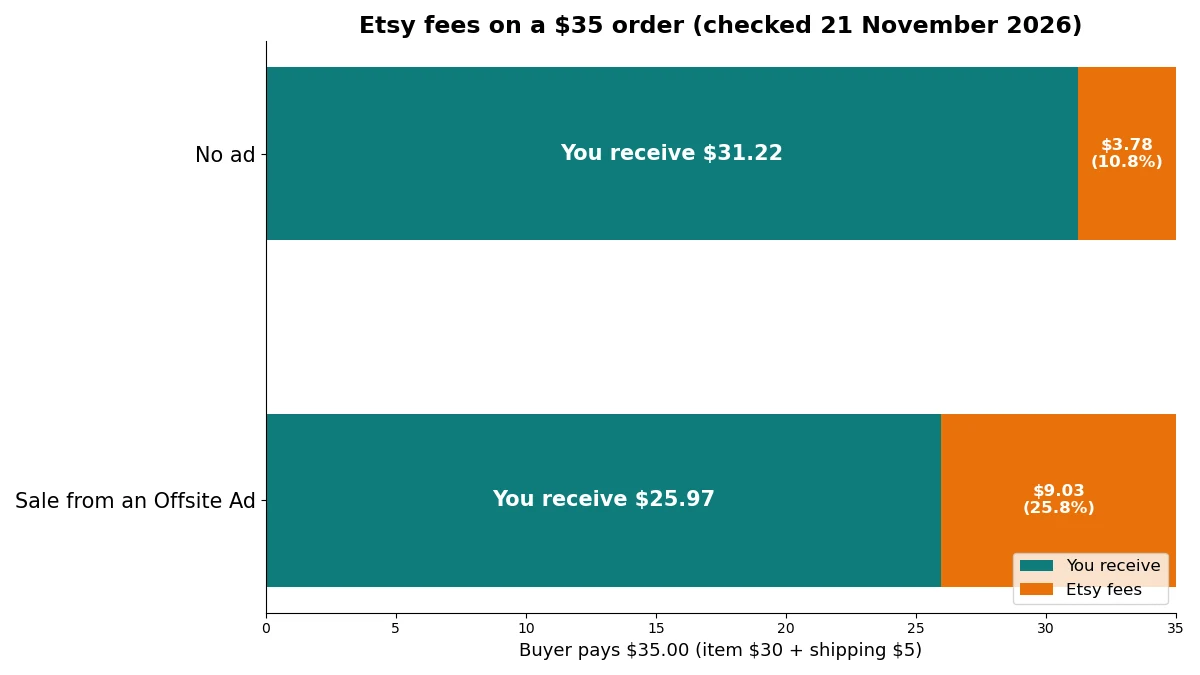
A $30 item, step by step
Take a $30 item with $5 shipping, so the buyer pays $35. The materials and postage costs below are made-up inputs for this example. Swap in your own. The fee rows come from Etsy’s policy. The numbers are before sales tax.
| Line | No ad | Sale from an Offsite Ad |
|---|---|---|
| Buyer pays (item + shipping) | $35.00 | $35.00 |
| Transaction fee (6.5% of $35) | $2.28 | $2.28 |
| Processing (3% of $35 + $0.25) | $1.30 | $1.30 |
| Listing fee | $0.20 | $0.20 |
| Offsite Ad fee (15% of $35) | $0.00 | $5.25 |
| Total Etsy fees | $3.78 (10.8%) | $9.03 (25.8%) |
| You receive | $31.22 | $25.97 |
| Your materials and packing (example) | $9.00 | $9.00 |
| Postage you pay (example) | $5.00 | $5.00 |
| Profit | $17.22 | $11.97 |
| Margin on the $35 order | 49% | 34% |
The ad cost you 15 points of margin on the same item. If sales tax is charged, the real fees run a little higher, because the processing fee applies to tax too.
How to price an item so an ad sale still pays
Work backward from the profit you want. Add your materials, packing and postage, add your profit goal, then add $0.45 for the fixed fees ($0.25 processing and $0.20 listing). Divide that total by the share of the order Etsy leaves you:
- No ad: divide by 0.905 (100% minus 6.5% and 3%).
- Offsite Ad at 15%: divide by 0.755.
- Offsite Ad at 12%: divide by 0.785.
Using the example above, costs of $14 and a $12 profit goal give $26.45 before dividing. Divide by 0.755 and the order total is about $35. Divide by 0.905 and it is about $29. Price for the ad case, and you earn at least your goal on every sale. This is arithmetic on the fees in the table, and it leaves out sales tax.
What you pay before your first sale
In many countries, the setup fee plus 10 listings costs $17 to $31 (a setup fee of $15 to $29, plus 10 × $0.20 = $2.00). Etsy shows your exact setup fee before you open the shop. Keeping 10 unsold listings live costs about $6 a year in renewals (3 four-month periods × 10 listings × $0.20).
Four ways fees surprise new sellers
1. Fixed fees hit cheap items hardest. Take a $4 printable with no shipping. If the listing is multi-quantity, the $0.20 renewal after the sale, the $0.26 transaction fee and $0.37 for processing add up to $0.83. That is about 21% of the price, and you keep $3.17. A bundle at a higher price spreads the fixed part.
2. Offsite Ads are a one-way door. Shops under $10,000 in the last 365 days can opt out. Once your shop passes $10,000, you can never opt out again. Past that line the fee is 12%, so build it into your prices before you get there. The details sit in the Offsite Ads section of the Fees & Payments Policy.
3. “Free” shipping is not free of fees. Etsy charges 6.5% on item price plus shipping, and processing on the full total. If you add postage into the item price, Etsy takes its share of that too.
4. Currency conversion adds 2.5%. Pick the currency of your payment account when you set up the shop, and list in it.
How to keep fees down
- Share your own link. Sales through your Share & Save link get 4 percentage points off the transaction fee. On the $35 order, that saves $1.40.
- Opt out of Offsite Ads while you can. Do the margin check from the table first. If you cannot live with a 15% cut, opt out.
- Do the Etsy Plus math. Etsy Plus costs $10 a month and includes $3 in listing credits and $5 in Etsy Ads credits every month. If you would use all of those credits anyway, the real cost is $2 a month. This guide does not price other Etsy Plus perks.
Can you open an Etsy shop in your country?
Only where Etsy Payments is available, which includes some countries through a Payoneer account. Those countries include Pakistan, Argentina, Brazil, Chile, Egypt, Georgia, Japan, Kazakhstan, Peru, Serbia, South Korea, Thailand, Ukraine and the UAE. Check Etsy’s current country list before you plan anything. Etsy’s help page states the rule plainly: you can only open a shop in a country where Etsy Payments is available. If yours is missing, Etsy has a help article called “Why Can’t I Open a Shop in My Country?”
Take the United States as an example. Payouts go to your US bank account in US dollars, and processing is 3% + $0.25 per order. On the same $35 order, the fees are the ones from the worked example above: $2.28 transaction, $1.30 processing and $0.20 listing, which come to $3.78 (10.8%). The US has no regulatory operating fee, and if you list in US dollars there is no currency conversion fee either.
How to sell on Etsy: the setup steps
Allow time for identity checks and payment setup. The steps below follow Etsy’s own order.
1. Create your Etsy account. Go to Etsy, choose Sign in, then Register. If you already have an account, use it. Then choose Sell on Etsy and Open your Etsy shop. Use a computer, because Etsy’s help page says first-time shop setup is done in a desktop web browser, not in the app.
2. Set your shop preferences. Pick your shop language, country and currency. Choose the currency of your payment account, or Etsy charges 2.5% to convert.
3. Name your shop. Choose a name buyers can spell and remember. Etsy says the name must not infringe a trademark, so search first. You can change the name after you open the shop.
4. Verify your identity. Etsy asks for this early in setup, with an ID and a selfie. You can keep setting up while the review runs, and you can check the status in Shop Manager on the Legal & tax information page.
5. Set up your payment account. Choose individual or business, then add the bank account for payouts. In Payoneer countries, you connect a Payoneer account instead. New shops commonly get a payment reserve, so your first payout will not be instant.
6. Add billing and secure your account. Add a card for Etsy’s fees, including the setup fee and listing fees. Turn on two-factor authentication. Etsy shows your exact setup fee before you open the shop.
7. Create your first listing. Add clear photos, a buyer-friendly title, a category, attributes, up to 13 tags, a description, a price and shipping details. Include at least one unedited photo of the real item. For a digital product, upload the file. Publishing costs $0.20.
8. Open your shop and finish the basics. Review everything, then open your shop. Add your shop policies, shipping profiles and About page. If you use print on demand, add your production partner. Then add more listings.
How do you get found on Etsy and land a first sale?
Write a clear, buyer-friendly title, fill all 13 tags with accurate phrases and complete every attribute. Use sharp photos. Etsy search reads the whole listing, not only the title. Then watch your Search Visibility page for weak listings and fix those first, before you pay for ads.
Etsy’s April 2026 title guidance says search looks at the title, tags, attributes, description, first photo and reviews together. It also warns against stacking repeated terms in a title. No single trick wins, so work through this list:
- Title. Write for a buyer, not a robot. “Weekly Planner Printable PDF, Undated, US Letter and A4” works. “Planner planner printable digital planner weekly planner” does not.
- Tags. Etsy allows up to 13 per listing. Use multiword phrases that name the item, the buyer or the occasion, and do not copy your title.
- Attributes. Fill in every one that fits, such as color, size, material or occasion. Etsy uses them to match searches.
- First photo. Make it clear and high resolution, and show the item the way a buyer will receive it.
- Weak listings. Use the search and stats pages in Shop Manager to see which listings need fixes.
Etsy also runs paid options, and each one carries a fee. Etsy Ads are optional and use a daily budget you set. This guide does not suggest a budget. Offsite Ads are the 15% or 12% fee from the cost section. Since September 2025, US buyers can also buy Etsy products inside ChatGPT, so a clear title and accurate details help wherever your listing appears.
You can also bring buyers yourself. Post your listings where your customers already spend time, such as Pinterest or TikTok, and send them through your Share & Save link so those sales cost less in fees.
Shipping, tax and import duties
Etsy collects and remits US sales tax in most states, and VAT on digital downloads where required. If you ship to US buyers from outside the US, since 9 July 2026 you must prepay import tariffs at checkout (Delivered Duty Paid) or the order loses Etsy Purchase Protection. Purchase Protection protects you as a seller, too, not just the buyer. Etsy’s seller page says that on a qualifying order paid through Etsy Payments, Etsy refunds the buyer and you keep your earnings if the item is damaged or does not arrive (terms apply). If you ship from outside the US, turn on duty prepayment before you take US orders. Older guides still say buyers pay import duties. That is no longer true for this case. Set a processing time you can keep, and ship inside it. Etsy caps processing time at 30 days unless your listing states a longer time.
Check how your country taxes shop income, and keep records of sales and costs.
Common problems and fixes
| Symptom | Likely cause | Fix | When the fix will not work |
|---|---|---|---|
| First payout has not arrived | Payment reserve on a new shop | Wait, and keep shipping on time | The reserve length is set by Etsy and varies by shop |
| Fees look higher than expected | Offsite Ads, processing on shipping and tax, currency conversion | Check each order’s fee lines, list in your payment currency, opt out of Offsite Ads if you are under $10,000 | You cannot opt out once past $10,000 |
| Your country is not an option | Etsy Payments is not available there | Check whether your country is on the Payoneer list | If it is on neither list, you cannot open a shop |
| A listing was removed | A bought design file on a laser or Cricut, undisclosed AI, an AI-generated pattern or instruction, no unedited photo, or no named partner | Read the removal reason, fix the listing, and appeal from the Policy violations page in Shop Manager if you think it was a mistake | A resold finished product has no fix |
| US buyers’ orders lose Purchase Protection | A seller outside the US is not prepaying tariffs | Turn on Delivered Duty Paid at checkout | None |
| No sales after launch | Unclear titles, weak photos, or a price that ignores fees | Fix the weakest listings first, then re-run the fee math | If there is no demand for the product, try another product |
Why sellers should sell on Etsy
Yes — if your product fits Etsy’s rules and your price can carry the fees. You skip the hardest part of selling online, which is finding buyers: they are already on Etsy, searching. What you get in return for the fees:
1. It costs little to start, and no monthly bill is required. The setup fee plus 10 listings runs $17 to $31 in many countries. A slow month costs you listing renewals, not a subscription.
2. Checkout and payments are built in. Etsy Payments handles card checkout at 3% + $0.25 in the US. You do not set up a payment processor of your own, which saves setup time.
3. Etsy handles tax collection on many sales. It collects and remits US sales tax in most states, and VAT on digital downloads where required. That saves you from collecting and sending that tax yourself on those sales.
4. Buyers already shop there. Etsy reported 87.5 million active buyers in Q3 2026, and $126 in sales per active buyer over 12 months. That audience saves you the cost of building traffic from zero. You share it with 5.8 million active sellers, so competition is real.
Who should not sell on Etsy
- Resellers of finished goods. Etsy’s Seller Policy does not allow reselling or dropshipping outside narrow cases, such as craft supplies.
- Sellers who use bought design files on machines. A licensed laser or Cricut file no longer qualifies under the 2025 rules.
- Thin-margin sellers. If you cannot cover 25.8% in fees on an ad-driven sale and still profit, raise your price or skip Etsy.
- Sellers who need cash right away. New shops commonly face a payment reserve.
- Anyone in a country without Etsy Payments or Payoneer access. You cannot open a shop.
- Sellers who cannot live with rule changes. Etsy sets the fees and the rules and updates them. The AI rules changed again in October 2026, and the fee table above carries a check date for that reason.
- Sellers who want full control of their brand and customer list. A store of your own may suit you better, though you then pay for your own traffic. Etsy’s Pattern website costs $15 a month after a 30-day free trial.
FAQ
Can you sell on Etsy for free?
Not completely. New shops pay a one-time setup fee, commonly $15 to $29 depending on country, and every listing costs $0.20. There is no required monthly fee, and Etsy takes its percentage cut only when something sells. The closest you get to free is a small shop with few listings and no ads.
Can you sell on the Etsy app?
You can manage an open shop in the Etsy Seller app, but first-time shop setup is done in a desktop web browser. Do the setup on a computer, then use the app for day-to-day management.
Do you need a business license to sell on Etsy?
Etsy does not list a business license among its opening steps, but your city, state or country might require one. Rules depend on where you live, what you sell and how much you earn. Check your local rules before your first sale.
How much does it cost to sell on Etsy?
A one-time setup fee, commonly $15 to $29, plus $0.20 per listing. When something sells, Etsy takes 6.5% of the price plus shipping, and payment processing of 3% + $0.25 in the US. On a $35 order the regular fees come to $3.78. If the sale came from an Offsite Ad, add 12% or 15%. The full fee table is in the cost section above.
How do I become a seller on Etsy?
Create an Etsy account, open the Sell on Etsy page, and follow the setup steps above: verify your identity, connect payments, pay the one-time setup fee and publish your first listing. There is no approval interview, and Etsy does not ask for a business registration, though your local rules may require one.
When do you get paid after a sale?
Not instantly on a new shop. Etsy commonly places a payment reserve on new shops, so first payouts take longer while the shop builds a track record of on-time, tracked shipping. Do not plan to spend that money on supplies in week one.
Your next step
Before you open a shop, run one test. Take your product’s real cost and postage, add the profit you want, and run the pricing formula for the 15% Offsite Ad case. If the price it gives is one buyers will pay, open your shop on a computer today and publish your first listing. If it is not, make a bundle, find a cheaper way to make the item or pick a different product path before you pay the setup fee.
